
Download Video Editor With Music APK – video editor, music video, video editing, photo to video, music clip, video filter, video speed, Instagram video, Vine video, video sharing
Overview
Video Editor With Music is a free multimedia application designed for Android users who wish to create and edit music videos with minimal effort. The software targets individuals looking to produce engaging visual content for social media platforms such as Instagram and Vine. Its primary purpose is to simplify the video editing process, enabling users to combine photos, music clips, and visual effects into dynamic, shareable videos. The app is particularly suited for casual creators, content curators, and social media enthusiasts who prioritize ease of use over advanced editing tools.
It supports basic video creation workflows, including adding personal media from the device’s storage, applying visual filters, adjusting playback speed, and enhancing clips with music effects. The software allows users to save edited videos directly to their device or share them instantly across popular platforms. While the developer, A2Z Tools, is identified, no further background on the company or its other products is available. Real-world usage scenarios include crafting short-form videos for personal storytelling, promotional content, or music-themed reels.
The developer did not provide additional system requirements or detailed performance benchmarks. Platform compatibility is confirmed for Android, but specific version support or hardware specifications remain unspecified.
Key Features & Capabilities
- Photo to Video Conversion: Users can compile personal photos into a slideshow-style video, ideal for memory reels or visual storytelling.
- Music Clip Integration: The app enables direct access to music files stored on the device, allowing users to sync video clips with audio tracks.
- Video Filters: A selection of visual filters enhances the aesthetic appeal of videos, helping users achieve a professional look without complex adjustments.
- Adjustable Video Speed: Playback rate can be modified to slow down or speed up clips, adding dynamic effects to the final output.
- Music Effects and Enhancements: Audio elements such as volume adjustments and FX can be applied to improve the listening experience.
- Instant Sharing: Edited videos can be shared directly to social media platforms like Instagram, streamlining the content distribution process.
These features support workflows such as creating music video montages, editing short clips for social media, or transforming static images into engaging visual narratives. The app’s intuitive interface ensures that even users with no prior editing experience can navigate the tools effectively.
User Interface, Workflow & Performance
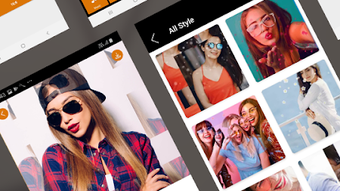
The user interface of Video Editor With Music is described as clean, simple, and fast. It features a streamlined layout with accessible controls for core editing functions. Navigation appears to be based on a tabbed or menu-driven structure, allowing users to move between importing media, applying effects, and exporting the final video. The workflow is designed to minimize steps, focusing on a linear process from media import to export.
Users can expect a responsive experience during basic editing tasks such as adding music, applying filters, and adjusting speed. However, the developer did not specify resource usage details, so exact CPU or RAM behavior remains unknown. Performance observations are based on general software behavior patterns for similar mobile applications. Stability during extended editing sessions or with large media files is not documented. The app’s lightweight size of 10.5 MB suggests efficient resource management, though this does not confirm performance under heavy load.
Compatibility & System Requirements
Video Editor With Music is designed for Android devices. The software version is 1.0.1, and the installation file size is 10.5 MB. The app is available for free, making it accessible to a broad audience. Platform compatibility information is limited to Android, but specific OS version requirements or hardware specifications were not provided by the developer.
Exact system requirements were not listed. The developer did not specify minimum RAM, processor speed, or storage space needed for optimal performance. Compatibility with older or newer Android versions remains unclear. Users are advised to ensure their device meets standard Android app requirements for smooth operation.
Pros and Cons
Pros
- Free to download and use, with no in-app purchase prompts mentioned
- Simple, intuitive interface suitable for beginners and non-professionals
- Supports common social media formats like Instagram and Vine videos
- Lightweight installation size (10.5 MB) reduces storage impact
- Offers core editing tools: filters, speed control, music integration
Cons
- Exact system requirements were not specified, limiting user preparedness
- Limited information on advanced features or export quality
- No details on video resolution or frame rate support
- Performance under heavy media load or long editing sessions not documented
- Developer support limited to email feedback, with no public forums or documentation
FAQ Section
Is Video Editor With Music compatible with my Android device?
Yes, the app is designed for Android devices. However, specific OS version compatibility was not provided by the developer. It is recommended to check your device’s Android version and ensure it meets standard app requirements.
Is the app safe to download and use?
Video Editor With Music is available as a free APK. While the developer, A2Z Tools, is listed, no third-party verification or security certifications were mentioned. Users should download from trusted sources and review app permissions before installation.
Does the app require an internet connection?
The app supports offline functionality for editing and saving videos. However, sharing content to social media platforms like Instagram may require an active internet connection.
Can I update the app manually?
Updates are likely available through official app distribution channels. Manual updates may be possible if a new APK is released by the developer. Users should monitor the developer’s contact method for release notes.
What type of license does the app use?
The app is distributed as free software with no explicit licensing details provided. It is intended for personal and non-commercial use, based on the developer’s description.
Final Thoughts
Video Editor With Music delivers a straightforward solution for Android users seeking to create music videos with minimal technical knowledge. Its focus on simplicity, combined with essential editing tools like filters, speed control, and music integration, makes it ideal for social media content creators and casual users. While advanced features and detailed performance data are not available, the app’s lightweight design and free access enhance its appeal.
It is best suited for individuals who prioritize speed and ease over professional-grade editing capabilities. The ability to export and share directly to platforms like Instagram and Vine adds practical value. For those looking to quickly produce engaging video content without a steep learning curve, this app offers a viable option.
Download Video Editor With Music now




.png)


